
Why this matters: Every Activity you complete is a permanent, auditable story of what happened on the member’s account. Capturing outcome, context, and the next step drives:
- Compliance (who said what, when),
- Member experience (clean handoffs, no repeat questions), and
- Performance (accurate reports, coaching, and next-best-action).
Jump to:
1. Activity anatomy (fields + logic)
2. Step-by-step: Complete an Activity
3. How to write notes that pass audit
5. Common member requests (what to do + why)
6. Quality checks & error traps
Activity Anatomy: fields & the logic behind them
Key fields you’ll see
- Activity Type (Call, Email, Task, Meeting) — drives reporting buckets & SLAs
- Results — tells the system what “happened” and what “happens next”
- Notes — fact pattern + decisions + member consent
- ? Next Step/Follow-up (date/time, owner) — keeps the baton moving
Step-by-Step: Completing an Activity
1. Open or start the Activity (from the member profile, or the Activities panel). Starting from the correct record auto-links history and prevents rework.
2. Confirm member identity before discussing policy specifics. (e.g., DOB + last 4 + address). Compliance & privacy.
3. Choose the right Activity Type & Subject. Use action-first phrasing: “Change of Address ” or “Change of Beneficiary".
4. Work the request using the correct workflow (see Common Member Requests). Keep the member informed: what you’re doing, why it’s needed, and when it will be done.
5. Select an accurate Outcome/Disposition. Example buckets:
- Completed • Completed w/ Contact• Scheduled Callback • Left VM • No Answer • Declined • Hung up
6. Schedule the Next Step (date/time, owner, channel). If none is needed, No follow-up is required.
7. Write audit-proof notes (see Note standard + templates). Attach required documents and tag the Activity.
8. Save/Complete the Activity. Confirm it appears in the member’s timeline and the linked record.
9. Close the loop with the member (recap what changed, what’s next, and timelines). Set expectations to prevent repeat calls.
How to Write Notes that Pass Audit
Use the FACT pattern:
- Facts verified (What was validated?)
- Action taken (exact fields updated/forms sent)
- Consent captured (member agreed to X at time Y)
- Timeline/next step (by whom, by when, how)
✅ Good note
CI via DOB + last 4 + address.
Address changed to 123 Lakeview Dr, Orlando FL 32801 effective today.
Member confirmed other information on file.
Weak note
Changed address. All set.
Missing CI, specifics, consent, and next steps.
Reusable Note Templates
Address / Phone / Email Update
CI: {method}.
Request: {address/phone/email}.
Action: Updated {field} to {new value}, effective {date}. Confirmed with member.
Impacts: Billing/communications updated; eBill {on/off}; returned mail check {if applicable}.
Next Step: {none / callback on DATE / verify doc}.
Outcome: {Completed/Completed w Docs/Escalated}.
Beneficiary Change (with form)
CI: {method}.
Request: Change beneficiary to {name, relationship, %}.
Action: Sent beneficiary form via {email/portal}; explained requirements (ID/signature/witness if applicable).
Consent: Member agrees to complete/return form.
Next Step: Follow up on {DATE} if not received; route to {queue} on receipt.
Outcome: Completed w/ Docs Pending.
Payment Method / Due Date
CI: {method}.
Request: {new card/ACH} / {due date change}.
Action: Updated payment method in system; verified successful tokenization / submitted due date review.
Risk/Disclosure: Explained proration/fees/processing cutoffs.
Next Step: Confirm on {POST DATE}; monitor for decline codes.
Outcome: Completed.
Name Change
CI: {method}.
Request: Legal name update to {new name}.
Action: Provided required docs list (e.g., gov’t ID, court order); created pending change.
Next Step: Follow up {DATE}; route docs to {queue}.
Outcome: Completed w/ Docs Pending.
Common Member Requests — what to do & why
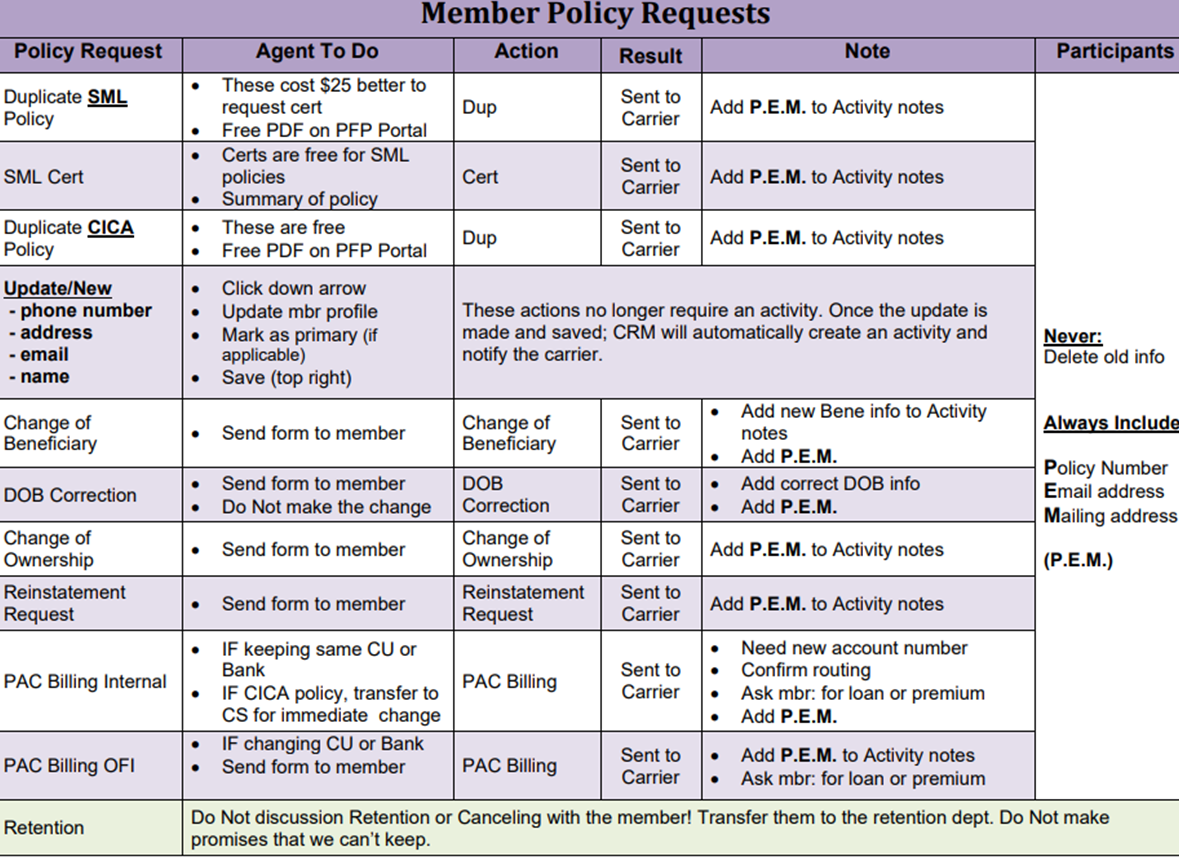
PII/PHI Rule of Thumb: Record only what’s operationally necessary. For payment methods, never write full card or account numbers—use last 4 only.
Quality Checks & Error Traps
- ?️ Was the Activity started from the correct record? (Member Profile)
- ? Does the Result match what actually happened? (No answer ≠ Completed)
- ? Is a Next Step scheduled? If not needed, state that explicitly.
- ? Do notes follow FACT? Would another agent understand exactly what you did?
- ? Are required NOTES attached? If not, mark accordingly.
⌚ Daily Rhythm for Prospect & Member Management
- Morning (first 30–45 min): Work scheduled follow-ups first (callbacks, docs checks).
- Prime hours: Focus on live contacts; finish for laters.
- End of day (last 15–20 min): Zero the queue: complete Activities, clean Outcomes, schedule tomorrow’s Next Steps.
Non-negotiables: Name and Ext before details, correct Result Type, Next Step set or explicitly not needed, and FACT notes are filled out and completed.