
Purpose: Use the Daily Planner as your home base to prioritize work, prevent misses, and track progress.
What is the Daily Planner?
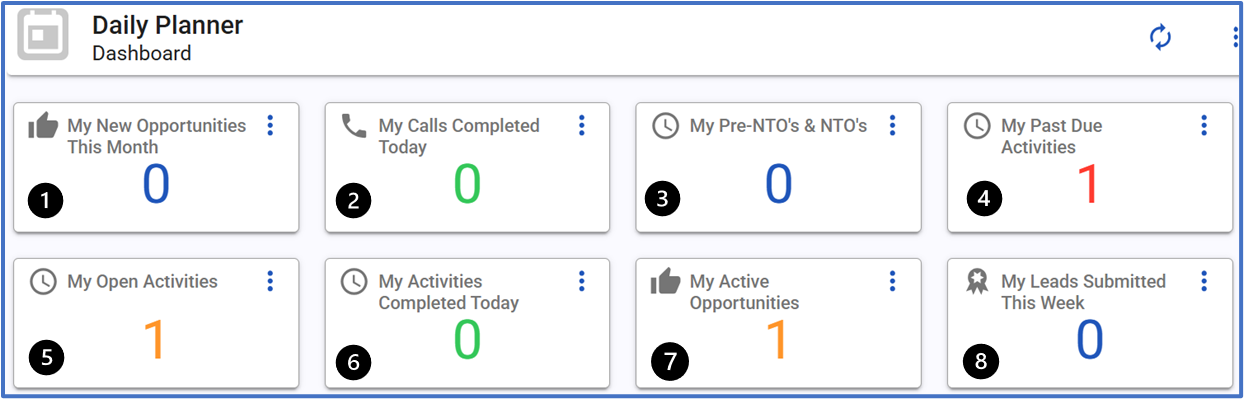
The Daily Planner summarizes what to work on next. It resets certain counters monthly and highlights calls, activities, leads, and at-risk business.
Planner widgets explained
- New Opportunities — New leads created this calendar month. Resets to 0 on the 1st.
- Calls Completed Today — Total inbound/outbound calls you’ve handled today.
- Pre-NTO & NTOs — Sold policies not yet paid; these are at risk of falling off commission. Act fast.
- Past Due — Activities you missed or didn’t complete on time. Start here.
- Open Activities — Upcoming/scheduled activities that are not yet completed.
- Activities Completed Today — Activities you successfully completed today.
- Active Opportunities — All leads ever assigned to you across PFP sources.
- Leads Submitted Each Week — Count of leads you’ve submitted to SAP/closers weekly.
How to work from the Planner
Morning (10–15 minutes)
- ? Open Past Due — clean up anything overdue.
- ? Check Pre-NTO & NTOs — call, resolve billing, or schedule follow-ups.
- ? Review Open Activities — confirm today’s schedule and prep for how you are going to be successful.
During the day
- ? Log calls via CRM (NEVER A CELL) so script and activity auto-populate.
- ? Complete activities with A. R. N. (Action, Result, Notes) immediately after each contact.
- ? Use Scheduled Call Back to create specific follow-ups (date/time) that funnel back to your planner.
End of day
- ✅ Check Open Activities- tie up any loose ends, activities you failed to complete (selecting a result type)
- ✅ Check Activities Completed Today — make appointments or schedule based off anything missed
- ? Review Leads Submitted Each Week and plan tomorrow’s outreach.
Tips & best practices
- ? The New Opportunities widget resets monthly—pace your follow-ups.
- ⚡ Use Open Activities + Past Due as your running “to-do” list.
- ? Keep activity notes specific (names, roles, ages, products) to speed up future closes.
- ? If you’re unsure what to do next: Past Due → Pre-NTO → Open Activities is a solid priority path. It breaks down to who you were supposed to call and follow up with → Current policy holders who purchased from you and haven't paid (which means you didn't get paid) → Anyone expecting follow up from you today or in the future